
Info-Extractor#
Extract information from academic papers in a structured, transparent, and reproducible way for systematic analysis and data synthesis.
Overview#
Info-Extractor is a paper-level information extraction tool designed to convert unstructured academic documents (PDFs) into structured, machine-readable data. It supports systematic reviews, meta-analyses, and large-scale evidence synthesis by enabling consistent extraction of predefined variables from scientific papers.
The tool allows users to upload PDFs or provide PDF URLs, define custom extraction schemas, and obtain structured outputs in formats suitable for downstream statistical analysis.
Purpose#
Info-Extractor is designed to:
Extract structured metadata and results from individual research papers
Reduce manual data-entry effort in systematic reviews
Improve transparency and reproducibility of data extraction
Support both rule-based and AI-assisted extraction strategies
You provide:
A PDF (local upload or URL)
A schema describing what information to extract
The system returns structured output in JSON and CSV formats.
Main Capabilities#
Structured Data Extraction
Extract key information into predefined, schema-driven fields.Custom Templates
Define your own extraction schemas with one field per line.Batch Processing
Process multiple papers sequentially using consistent schemas.Quality Control
Built-in schema validation and evidence-based consistency checks.Export Formats
JSON and CSV outputs designed for Excel, R, Python, and database ingestion.
Extraction Modes#
Heuristics-Based Extraction (Default)#
Regex-based and rule-driven
Evidence-backed value extraction
Fast, deterministic, and transparent
Well suited for technical metadata (e.g., sample size, TR, TE, scanner parameters)
LLM-Assisted Extraction (Optional)#
Uses a local Ollama model
Constrained by an automatically generated JSON Schema
Heuristics fill missing or null values
No external API calls (fully local execution)
Typical Workflow#
Complete Paper Set
Define Schema
Extract Data
Validate Results
Export Data
Analysis / Meta-analysis
Common Extraction Fields#
Info-Extractor can be configured to extract a wide range of variables, including:
Study Characteristics#
Publication year, authors, journal
Study design and methodology
Sample size and participant demographics
Geographic location
Research Findings#
Primary outcomes and measures
Statistical results (p-values, effect sizes, confidence intervals)
Key findings and conclusions
Reported limitations
Quality Assessment#
Risk-of-bias indicators
Study quality or reporting scores
Funding sources
Conflicts of interest
How to Run Info-Extractor (Local)#
One-Time Setup#
Clone the repository (the same one as Paper-Finder) and create an environment for the backend:
git clone https://github.com/sanahassanimam/Automating-the-Information-Extraction
conda create -n paperextract python=3.11 -y
conda activate paperextract
pip install fastapi uvicorn python-multipart pymupdf httpx jsonschema
The package list is taken from the backend’s imports (server.py); the repository does not ship a requirements.txt, so check its README if the backend reports a missing module.
For the optional LLM-assisted mode, install Ollama and pull a model.
Terminal 1 — Ollama (Optional)#
ollama serve
Terminal 2 — Backend (FastAPI)#
cd Automating-the-Information-Extraction/Info-extractor/backend
conda activate paperextract
uvicorn server:app --reload --port 8000
API root:
http://127.0.0.1:8000
API documentation:
http://127.0.0.1:8000/docs
Terminal 3 — Frontend (HTML UI)#
cd Automating-the-Information-Extraction/Info-extractor/frontend
python -m http.server 5173
The folder is Info-extractor, with a capital I and a lowercase e - on Linux, folder names are case-sensitive.
Open in browser:
http://127.0.0.1:5173/extractor_ui.html
Workflow Overview#
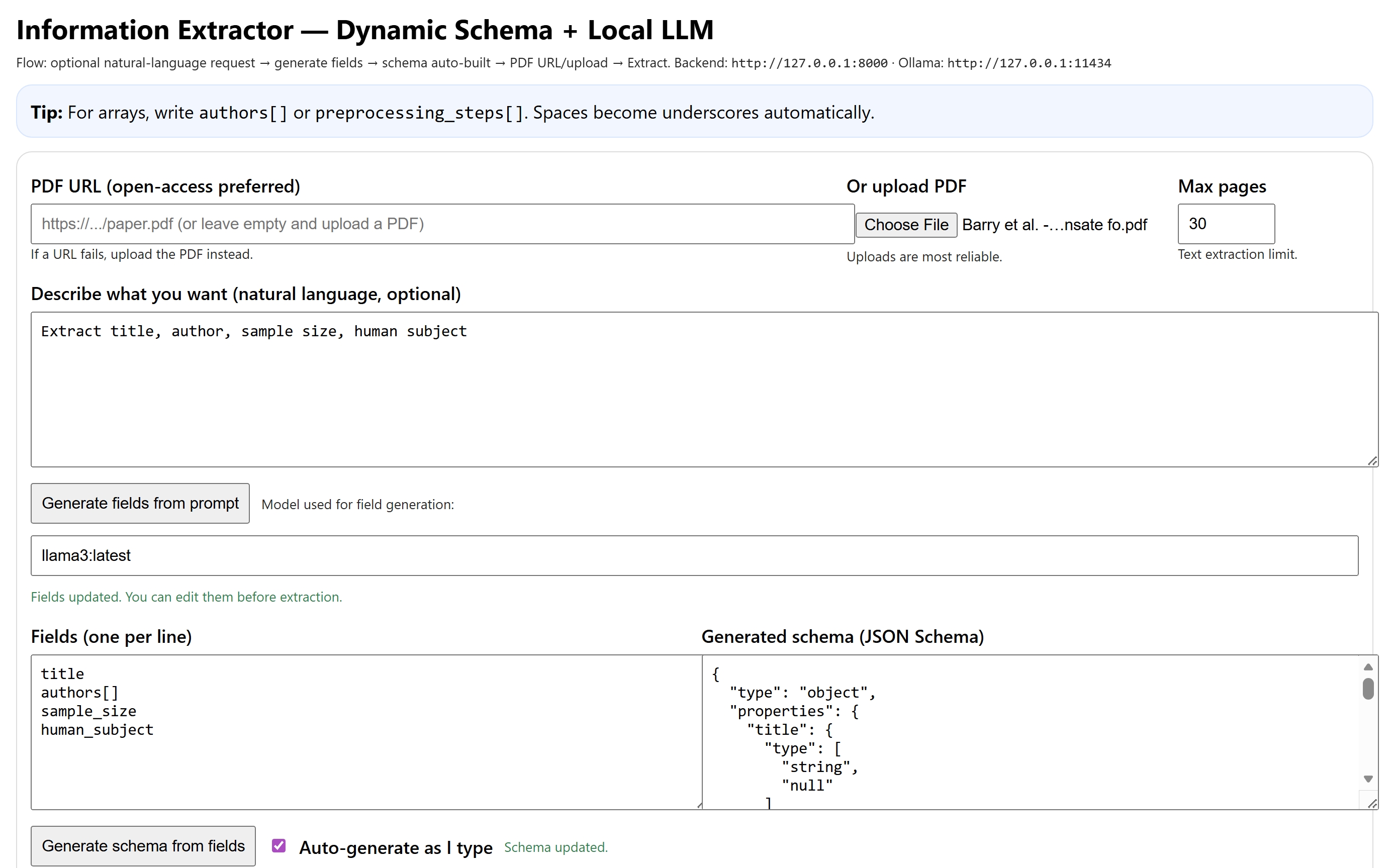
Extraction Logic#
Heuristics provide evidence-backed values whenever possible.
If LLM extraction is enabled, LLM output is applied first.
Missing or null fields are filled using heuristics.
Final output always conforms to the generated JSON Schema.
Integration with Other Tools#
Tool |
Purpose |
Info-Extractor Role |
|---|---|---|
Review Buddy |
Paper collection |
Receives papers to extract from |
Elicit |
AI screening |
Complements with structured extraction |
Excel / R / Python |
Statistical analysis |
Consumes structured outputs |
Use Cases#
Info-Extractor is ideal for:
Systematic Reviews: Consistent, documented data extraction (report the process as PRISMA 2020 asks under data collection process and data items)
Meta-Analysis: Collecting statistical inputs for quantitative synthesis
Scoping Reviews: Mapping study characteristics across domains
Evidence Synthesis: Compiling structured findings from many papers
Quality Assessment: Consistent evaluation of study quality
Best Practices#
Define your extraction schema before starting the extraction process to ensure consistency.
Avoid changing schemas mid-way through a review unless absolutely necessary.
Keep schemas version-controlled for traceability.
Quality Control#
Always validate extracted data through:
Manual double-checking of critical fields
Inter-rater reliability checks for meta-analysis inputs
Schema validation logs
Data and Reproducibility Notes#
Do not commit large PDFs or private datasets to GitHub.
Store PDFs locally in non-tracked directories.
Commit only code, schemas, and small example outputs to version control.