
Paper-Finder#
GUI-based tool for discovering, reviewing, and exporting academic papers across multiple databases.
Overview#
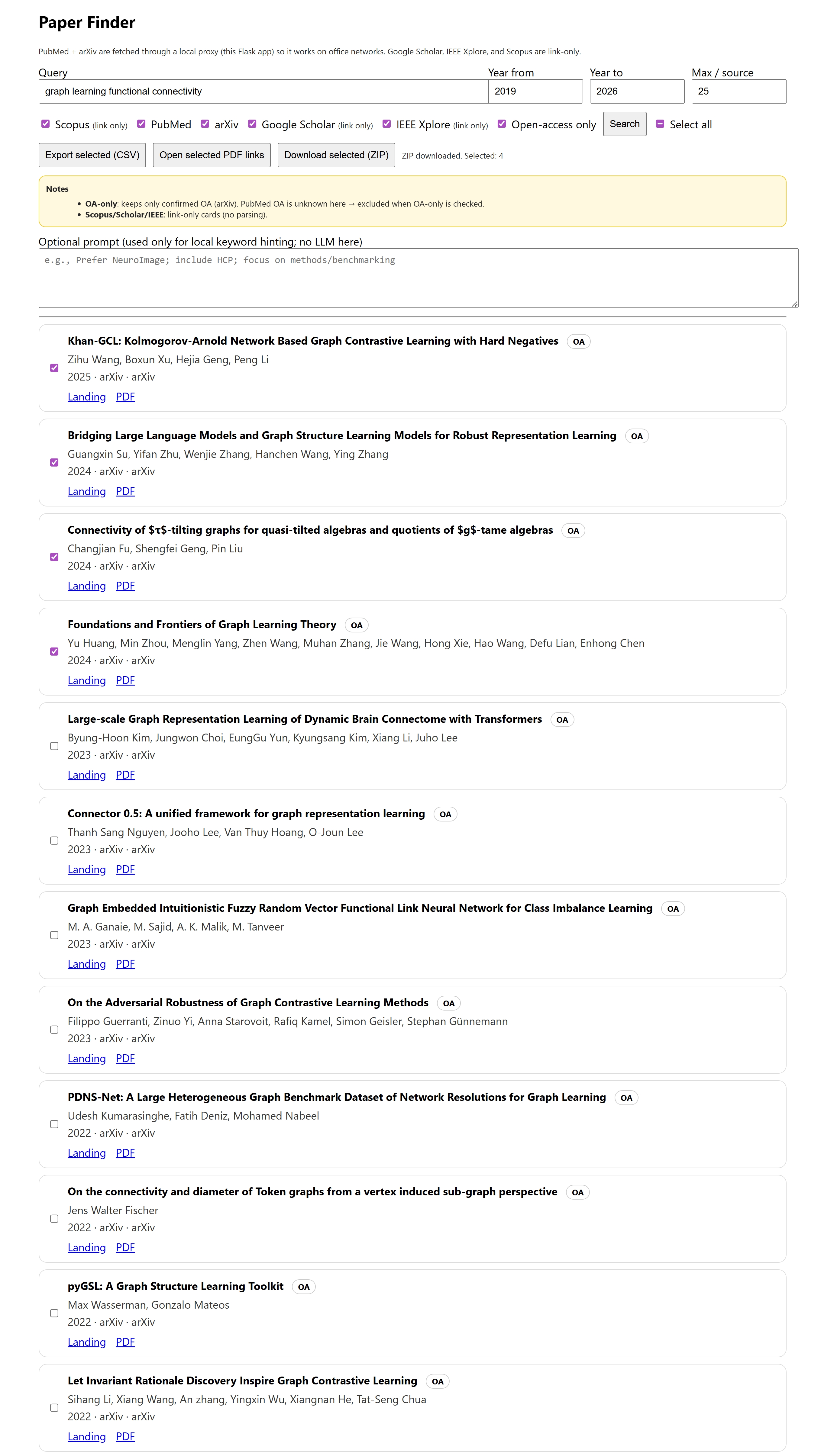
Paper-Finder is a lightweight, browser-based graphical user interface (GUI) that simplifies the process of searching for academic literature across multiple sources. It is designed for researchers who want a fast, transparent, and reproducible way to explore papers without relying on command-line tools or proprietary platforms.
The tool combines a local Flask backend (for reliable API access) with a clean HTML/JavaScript frontend, making it suitable for office networks, teaching environments, and collaborative research workflows.
Paper-Finder is especially useful as an early-stage literature discovery tool, before moving into systematic screening or automated review pipelines.
Key Features#
✅ Implemented Features#
Multi-Source Search#
PubMed (via local proxy)
arXiv (via local proxy)
Google Scholar (link-only)
IEEE Xplore (link-only)
Scopus (link-only)
Graphical User Interface#
Runs entirely in the browser
No command-line interaction required after setup
Clear visual presentation of results
Year-Filtered Search#
Specify start and end publication years
Filters applied consistently across sources
Open-Access Filtering#
Restrict results to confirmed open-access papers (currently arXiv)
Selection & Batch Actions#
Per-paper checkboxes
“Select all” toggle with correct indeterminate state
Batch export and download actions
Export Options#
Export selected papers to CSV
Open all available PDF links in browser tabs
Download selected papers as a ZIP archive, including:
Metadata CSV
Links file
PDFs (where available, e.g., arXiv)
Office-Network Friendly#
PubMed and arXiv requests are routed through a local Flask server
Avoids common corporate firewall issues
Main Capabilities#
Unified Discovery Interface#
Search multiple academic sources from a single screen.
Transparent Metadata Handling#
Titles, authors, year, venue, source, open-access status, and links are clearly exposed.
Manual Review Support#
Designed for human-in-the-loop exploration rather than opaque automation.
Reproducible Outputs#
CSV and ZIP exports can be version-controlled or shared with collaborators.
Getting Started#
Requirements#
Python 3.9+
Internet access
Modern web browser (Chrome, Firefox, Edge)
Installation#
Clone the repository:
git clone https://github.com/sanahassanimam/Automating-the-Information-Extraction
cd Automating-the-Information-Extraction/Paper-finder
Note the lowercase f in Paper-finder: on Linux, folder names are case-sensitive.
Install Python dependencies:
pip install flask requests
Start the local server:
python server.py
Open your browser and navigate to:
http://127.0.0.1:5174/search.html
That’s it — no additional setup required.
How It Works#
Architecture#
Frontend
Plain HTML, CSS, and JavaScript
No frameworks or build steps
Runs entirely in the browser
Backend
Flask server (
server.py)Proxies PubMed and arXiv requests
Generates ZIP exports server-side
Data Flow#
User submits a query via the GUI
Flask backend fetches results from PubMed and/or arXiv
Link-only sources generate direct search URLs
Results are merged and displayed in the browser
User selects papers and exports data as needed
Exported Data#
CSV Export#
The CSV file includes:
Title
Authors
Publication year
Venue / journal
DOI (if available)
Source database
Open-access status
PDF URL
Landing page URL
This format is suitable for:
Spreadsheet analysis
Screening tools
Downstream automation pipelines
ZIP Export#
The ZIP archive contains:
selected_papers.csvlinks.txt(human-readable overview)pdfs/directory (when PDFs are available)zip_log.txt(summary of downloaded PDFs)
Comparison with Other Tools#
Feature |
Paper-Finder |
CLI / Python Tools |
Publisher Websites |
|---|---|---|---|
Interface |
GUI (Browser) |
Command-line |
Web |
Ease of Use |
⭐⭐⭐⭐⭐ |
⭐⭐ |
⭐⭐⭐ |
Transparency |
⭐⭐⭐⭐⭐ |
⭐⭐⭐⭐ |
⭐⭐ |
Automation |
⭐⭐⭐ |
⭐⭐⭐⭐⭐ |
⭐ |
Reproducibility |
⭐⭐⭐⭐ |
⭐⭐⭐⭐⭐ |
⭐ |
Setup Overhead |
⭐⭐⭐⭐ |
⭐⭐ |
⭐⭐⭐⭐⭐ |
Use Cases#
Paper-Finder is ideal for:
Exploratory literature searches
Early-stage systematic reviews
Teaching literature search strategies
Collaborative screening sessions
Non-technical researchers
Office or university network environments
Preparing datasets for downstream review tools
Limitations & Notes#
Google Scholar, IEEE Xplore, and Scopus are link-only (no scraping)
PubMed open-access status is not resolved automatically
PDF downloads depend on source availability (arXiv works best)
Not intended as a full systematic review automation engine